‹ Blog · October 28, 2026
Studio: new models, quality presets, commercial list
Between 0.1.36 and 0.1.38 Studio's model list changed: Wan 2.2 TI2V-5B and LTX-Video 2B arrived, Fast/Balanced/Quality presets were added, and models not suitable for commercial use left the list.
When Studio arrived in 0.1.33, the model list was small. In the next three versions both the list and the settings changed. This post explains those changes and what is still unmeasured.
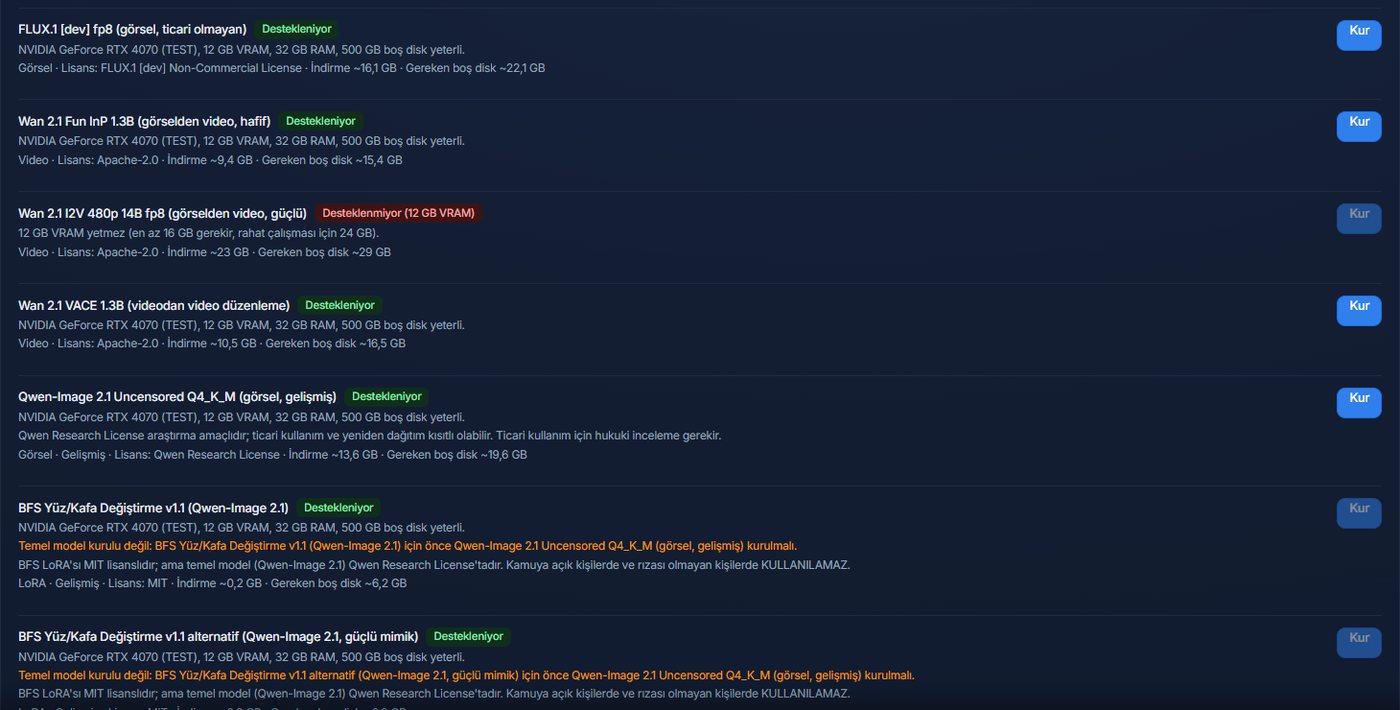
The commercial-use list (0.1.36)
With 0.1.36, models whose licence is not suitable for commercial use, namely Qwen-Image, BFS and FLUX dev, were removed from the default list. If one of these models is already installed on your computer, it appears in the list only so you can remove it, and your files are not touched. Whether to remove it is up to you.
This does not mean we assess each model's licence in your place. For the models that stay in the standard list too, read the licence text yourself before using them; this matters especially for commercial use.
Image with Qwen, administrator mode only (0.1.37)
In 0.1.37 a path for generating images with the Qwen-Image model that is already installed on your computer was added, reserved for administrator mode. There is an administrator info card and a related row in Settings. The model list does not change for a standard user. If no local model exists, the agent tool falls back to an SVG/HTML instruction and an info text about Qwen is shown; an honest note about photorealistic generation was added too.
New video models (0.1.38)
Two models were added for image-to-video:
- Wan 2.2 TI2V-5B: with GGUF Q4 and Q5 and fp16 options.
- LTX-Video 2B distilled.
The old "Fun InP" model was removed. On low-memory graphics cards the quantised versions run as "borderline/slow"; how suitable a model is for your card is calculated in Settings from your card. If your card is not enough, low memory mode tries to step in (since 0.1.34).
LTX-Video licence condition: according to the release notes it is free for organisations with annual revenue under 10 million $; larger ones need a paid licence from Lightricks. The condition is shown during installation. Still, read the licence text yourself before using it.
Quality/speed preset
Three presets arrived: Fast, Balanced, Quality. Output compression was improved as well, which means less blur in the picture. The default resolution of low memory mode became 832×480. The preset changes the balance between time and quality on the same model and card; we cannot tell you how long each preset takes on your card, because the note below applies.
An honest note: not measured
The new models in 0.1.38 (Wan 2.2 TI2V-5B, LTX-Video 2B and FramePack in research mode) have not yet been measured on real graphics cards. Time and memory values are estimates; results can vary with your hardware. That is why we do not say "it finishes in this many seconds on that card". The 0.1.39 release notes repeated this.
Research models and safety
FramePack (image-to-video) opens only in administrator research mode, with confirmation and an audit record; it is not in the standard list. Face swapping and research-purpose models also open only in administrator mode, and mode warnings are shown on screen. For a standard user the list stays limited to models suitable for commercial use.
The safety gate did not loosen with these changes: the limit on face swapping and on content involving minors cannot be turned off. Adding a new model does not bypass this gate.
Which model to try when
We cannot give a firm ranking, because the new models were not measured. Still, a sensible order of trying is this: first choose the model your card shows as suitable in Settings, produce a short clip with the Fast preset and look at the result. If the picture is not enough, move to Balanced, then to Quality. At each step time grows and the memory need can increase. If your card says "borderline/slow", take that warning seriously: the job may run but take a long time, and it can be cut short if memory is not enough. If you send us the times and results you measured with the Suggestion / Complaint button in the program, later versions can get closer to real values.
Disk and download
The new models are large files too and are downloaded into the model folder. Quantised versions (GGUF Q4/Q5) are smaller than fp16 and need less memory; there may be a difference in quality in return, but it would not be right to say how big that difference is without trying it on your own card. If disk space is tight, moving the model folder to another drive and removing models you do not use helps.
What this means for you
- On a fresh installation the list starts with models suitable for commercial use.
- Models left on an older installation are not deleted; the remove button is shown.
- There are two new options in image-to-video, but they have not been measured on real cards; do a short trial first.
- If your card is not enough at all, you can use a GPU that is not in your computer through Remote generation; that feature is experimental.
Next step
Where to download models and how to manage installed ones is in Choosing a model folder. For a summary of all the versions, see the 0.1.34 to 0.1.42 summary.