‹ Blog · October 28, 2026
Agent X 0.1.34–0.1.42: new name, models, Remote generation
What changed from 0.1.34 to 0.1.42: the Agent X name and modelagentx.com, low memory mode, new video models, the web panel tool, display scaling and remote generation through HyperAI.
Nine versions have shipped since Agent X 0.1.33. Instead of listing them one by one, this post groups them into meaningful parts: name and address, installation, Studio, agent tools, screen and remote generation. Where a detailed post exists we link to it. The current version is 0.1.42 and you get it from the Download page.
A note: this post relies only on the official release notes of versions that have been published. It does not describe anything that is not out yet.
The app interface is currently in Turkish, so screen names are given in English with the Turkish label in parentheses where it helps.
1. Name and address: 0.1.34 and 0.1.35
The program is now called Agent X. The window title, the welcome and settings texts, the update notice and the phone app show the new name. In 0.1.35 the installer file name and the installer title changed too (in the form Agent-X-Setup-0.1.35.exe). Your data, sessions, install folder and shortcut stay exactly as they were; the new version updates over your existing installation.
The server address also became modelagentx.com. Updates, suggestions, bug reports, licensing and the phone link go to this address first. If it cannot be reached, the program falls back to the old address (melowood.com) by itself and you see no error. Phones you paired earlier keep working. The details are in modelagentx.com and the Agent X name.
Update security did not change in any of these versions: the downloaded installer is verified with the publisher's signature.
2. Installation: 0.1.36
First installation on a new computer was fixed. The built-in database of the program is now installed on first launch even on a clean Windows; the required Microsoft runtime files were added to the package. If the first attempt is left half-done, the program safely tidies the half-finished folder and tries again by itself, without touching your existing data. If an error occurs, the screen shows the reason and a "Retry" button.
Program installs now go into a queue: when you install several programs in a row you see the queue number, you can remove the next one, and you are warned if there is a conflict. Claude Code is installed without winget, through the official installer (with verification); if that does not work, a command line fallback takes over. For the full setup, see Setup and first sign-in.
3. Studio: weaker cards, new models, presets
- 0.1.34, low memory mode: on a card whose video memory (VRAM) is not enough, Studio tries to work in "Low memory mode (slow)". A warning is shown first; if you confirm, the job runs slowly but runs. On cards such as GTX 16xx and T400, full precision (fp32) is used to avoid black output, and this mode increases the memory requirement. It is a door to try, not a guarantee; see the graphics card post.
- 0.1.34 and 0.1.36, Turkish prompts: on the agent path, an image or video prompt written in Turkish comes back with an "the prompt must be in English" warning, without spending tokens.
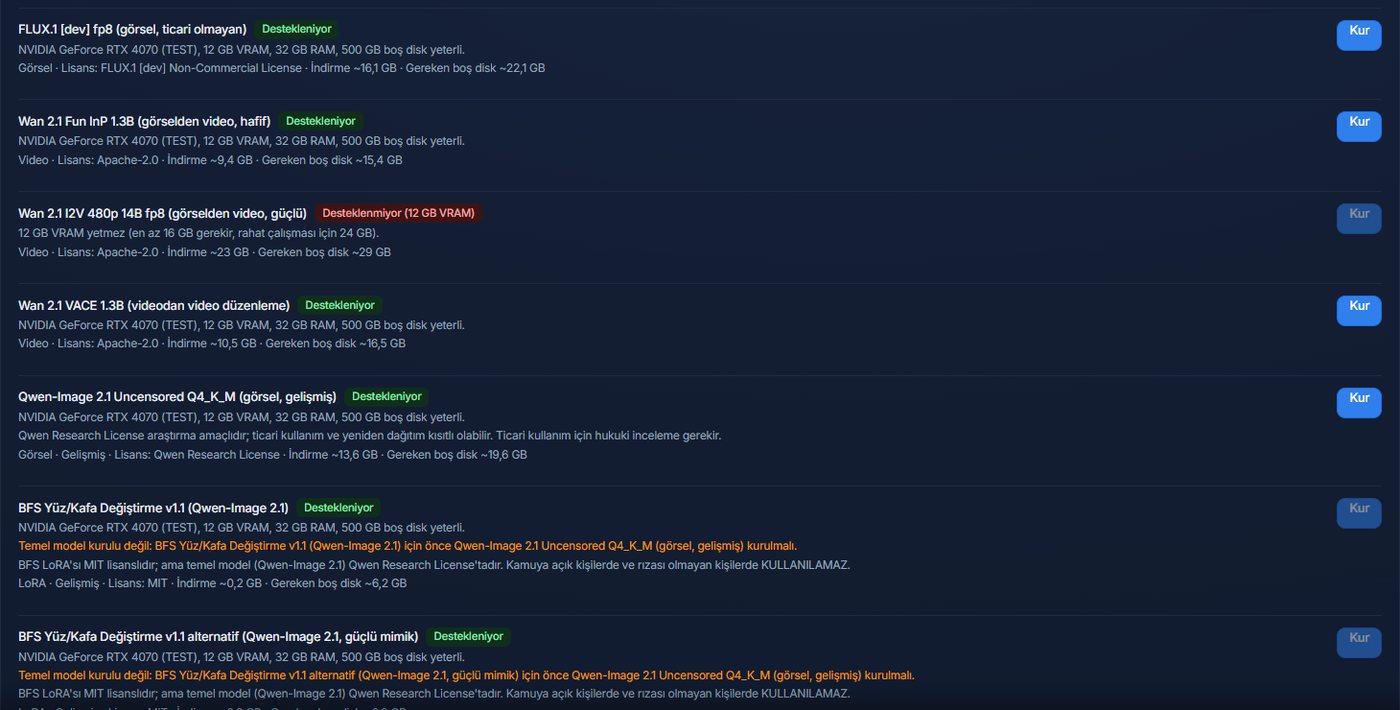
- 0.1.36, list suitable for commercial use: models whose licence is not suitable for commercial use (Qwen-Image, BFS, FLUX dev) were removed from the default list. If one is already installed on your computer it appears only so you can remove it; your files are not touched.
- 0.1.37, Image with Qwen: in administrator mode you can generate images with the Qwen-Image model that is already installed on your computer. The model list does not change for a standard user.
- 0.1.38, new video models and presets: Wan 2.2 TI2V-5B and LTX-Video 2B distilled arrived for image-to-video, and the old "Fun InP" was removed. Fast, Balanced and Quality presets were added. More in new models in Studio.
The new models in 0.1.38 were not measured on real graphics cards; time and memory values are estimates.
4. Agent tools and screen: 0.1.37 and 0.1.39
Web panel tool (0.1.39): agents can work on your behalf in the administration panels in your browser. Passwords are kept in an encrypted vault, the session is persistent and tied to the site. A smart confirmation is asked for risky steps, and elements on the page are found through the accessibility tree.
Screen and text scale (0.1.37): the interface scales automatically to the screen size (between 0.70 and 1.25). You adjust it by hand with Ctrl +, Ctrl − and Ctrl 0; "Reset view" in the Appearance (Görünüm) card of Settings returns to the default. The window fits the screen and the terminal font size is at most 22. The same version also made small Studio fixes: you can close and clean finished or half-finished jobs, error texts became plainer, and the report mock-up opens in a safe preview.
5. Remote generation: 0.1.39 to 0.1.42
If your computer has no strong NVIDIA card, you can have image and video generation run on HyperAI's remote graphics cards. It arrived in 0.1.39 as an experimental card; 0.1.40 and 0.1.41 added session and resource list fixes, the ready-made Wan 2.2 path and Cosmos Predict2. 0.1.42 fixed the crash in longer videos, added the Wan 2.1 720p, LTX-2.3 turbo and MiniMax H3 models, and brought a step-by-step setup wizard. The whole story is in its own post: Remote generation.
The honest status of this feature: it is experimental. Wan's chunked 10-second generation and the LTX and H3 test videos were tried by hand on HyperAI, but a real GPU job was not opened and tested end to end from inside Agent X in this version. Most cost estimates were not measured.
What did not change
- The safety gate: the limit that blocks face swapping and content involving minors cannot be switched off or bypassed; every generation path, remote generation included, passes through the same gate, audit log and cost confirmation.
- Research-purpose models (face swapping, FramePack and similar) open only in the administrator research mode, with confirmation and an audit record.
- Your data, sessions and install folder stay exactly as they are across updates.
Next step
The update arrives in the app by itself; if you want to get it by hand, 0.1.42 is on the Download page. For plan prices and limits, Plans and licence is current. If you notice a problem, reporting it with the Suggestion / Complaint button in the program helps a lot.