‹ Blog · October 25, 2026
Agent X 0.1.33: Studio, new agents and model management
What changed in 0.1.33: the local image and video Studio, YouTube and Trendyol agents, prompt translation, the fixed top menu and model management.
Agent X 0.1.33 is the stable version on the Download page right now. This post explains the release notes in plain language and points to the post with the details of each item.
The app interface is currently in Turkish, so screen names are given in English with the Turkish label in parentheses where it helps.
Studio has arrived
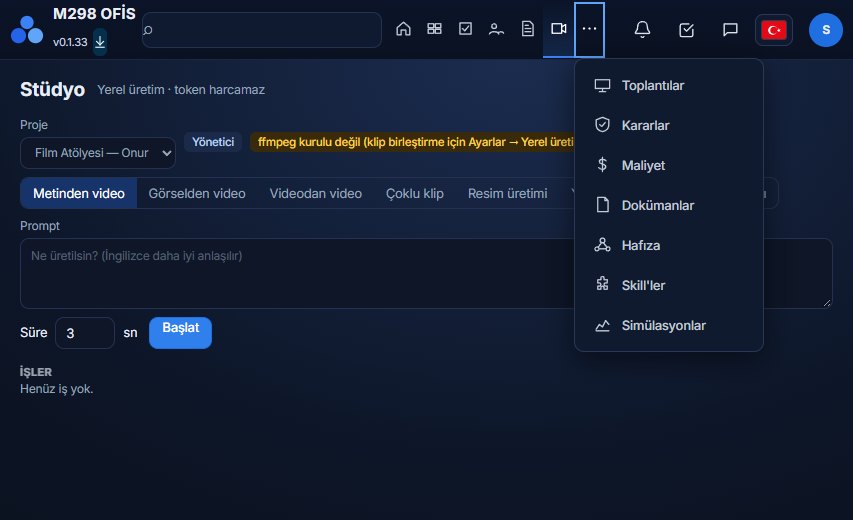
A new section that generates images and video locally. Generation happens on your own graphics card; your agents use the same local models, and this way image and video prompts do not spend tokens. The types are text to video, image to video, video to video, multi-clip, image generation and storyboard. Before an output is saved to your computer you are asked with an approval card.
An important limit: local generation works only on Windows with an NVIDIA graphics card, models are large, and on cards that do not meet the threshold 0.1.33 refuses to install the model. Details: Generating images and video on your own computer with Studio and the graphics card post.
New agents: YouTube and Trendyol
The YouTube agent researches a video and prepares an upload; the Trendyol agent helps with product and store work. Both are added with one click so that they prepare a summary every morning at 09:00. For steps that go outside, such as uploading or sending a reply, an approval card asks you first. Details: YouTube and Trendyol agents.
Prompt translation
If the prompt you write in Studio is in Turkish, it is translated into English for the model; you can have the translation done with the local engine, Opus or Codex. If an option will spend tokens it is asked first, and you can ask it to remember your choice. This step exists because generation models work best with English prompts; the interface and reports stay in Turkish.
The top menu is fixed
Tabs that do not fit are no longer silently clipped. When the window or the screen is small, the extra tabs are gathered under "⋯ More" and the open tab is always visible. Before, the Studio tab was at the very end of the menu, so it was the first to disappear when space ran out; this is fixed. Also, a temporary error no longer makes the Studio tab disappear.
Models are managed
You can delete a downloaded model, move it to another folder or open its folder. Before installing you can choose the model folder yourself, so large models do not have to go to your C drive. Shared files are protected during deletion. Details: Choosing the model folder and managing models.
Installer fixes
The installer file and the update flow work more robustly. How an update works: the downloaded installer is verified with the publisher's signature and its checksum (SHA-256). On the Download page you also see the SHA-256 value of the version; by comparing the file you downloaded with it you can make sure it was not corrupted.
Verifying the file you downloaded
The SHA-256 value on the Download page is the file's fingerprint. In Windows PowerShell you compute your own file's value with the command Get-FileHash -Algorithm SHA256 and compare it with the one on the page. If they match, the file was not corrupted. Because the app is unsigned, Windows may show a warning on first launch; this verification exists to give you confidence in that case.
Known limits
- Studio works only on Windows with an NVIDIA graphics card.
- Studio's workflows were tried in a test setup with a fake engine; real generation was not tried on every card and model combination.
- Large video models ask for a powerful graphics card; so not every model opens on every machine.
Who this release is for
For current users the main news is the fixed top menu and model management. For those curious about local video and image generation, Studio is worth trying if your graphics card is suitable; if it is not, all of the agent team features of Agent X work exactly the same without using Studio. For plan limits see Plans and license.
Not released yet
Among the notes prepared for the next version, 0.1.34, there are the following; they are not in 0.1.33:
- The program's name will be updated to Agent X. Your data, sessions and install folder stay as they are, and the update is applied over the existing install.
- The option to try Studio on a weak graphics card in "low memory mode (slow)".
- A Turkish image or video prompt written on the agent path will come back with an "the prompt should be in English" warning without spending tokens.
When the release date is known it will be announced on the Download page and in this blog.
How do I update
If the app is already installed, it shows an update notice when a new version comes out. If you are installing for the first time, follow the three steps in Setup and first sign-in. Windows may show an unrecognised publisher warning on first launch; why and what to do is written on the FAQ page.
Feedback
If something does not work as you expect, use the Suggestion / Complaint button at the top of the app. The message you send is tied to your account and you see the reply in the same place.