‹ Blog · October 25, 2026
YouTube and Trendyol agents: summaries, drafts, approvals
Two ready-made agent roles prepare a summary every morning at 09:00 and write draft replies. Publishing and sending are left to you. What they do and what they do not.
Agent X 0.1.33 comes with two new ready-made agent roles: YouTube Manager and Trendyol Manager. What they have in common is this: they do the preparation, and they ask you first before any step that goes outside.
The app interface is currently in Turkish, so screen names are given in English with the Turkish label in parentheses where it helps. Trendyol is a Turkish online marketplace; the Trendyol agent is mainly for sellers who use it.
Add with one click
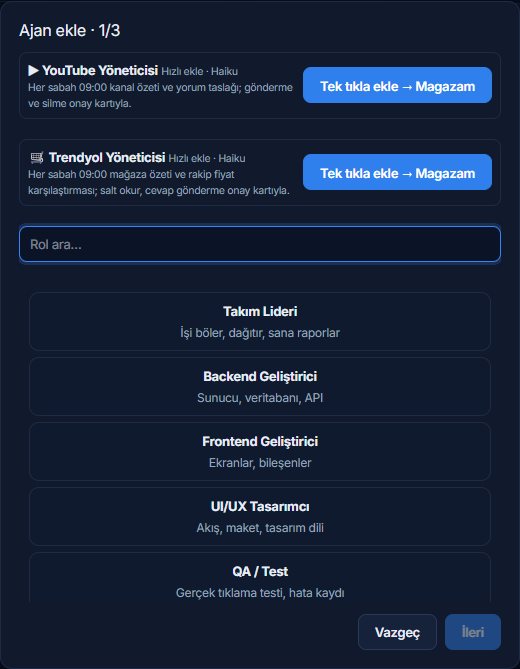
Both roles sit at the top of the "Add agent" screen as quick cards. When you press "Add with one click", the agent is added to your project and a daily job that runs every morning at 09:00 is set up. You can start without searching the role list or picking a team template. The quick card is on both "Add agent" screens (the Employees screen and the 3D office wizard). Both roles run by default with the light model Haiku; you can change it if you want.
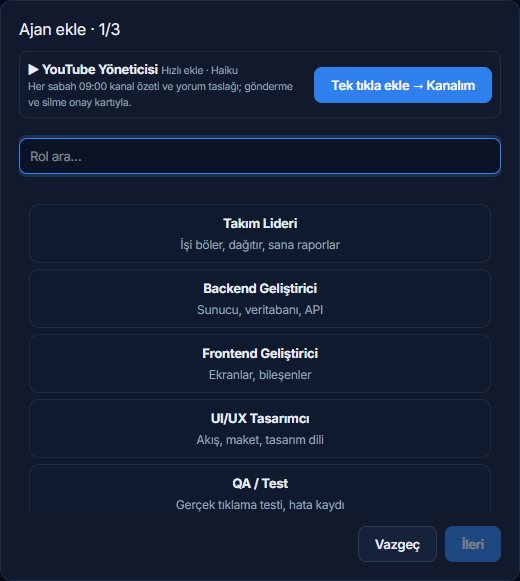
What the YouTube Manager does
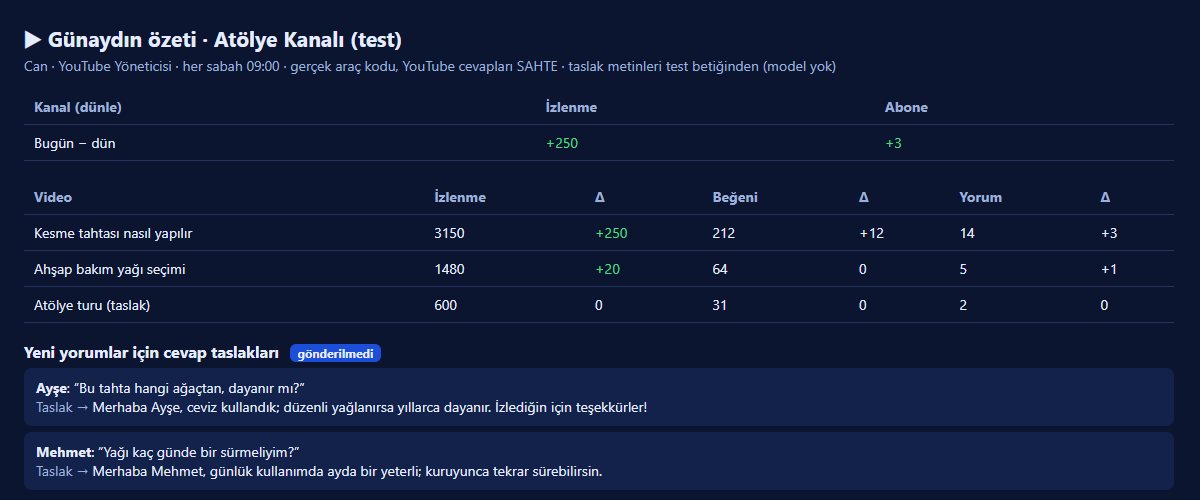
- Channel summary: the difference in views and subscribers between yesterday and today, and the view, like and comment counts of the videos, in one table.
- Comment drafts: writes reply drafts for new comments. Drafts are shown with a "not sent" label.
- Upload preparation for Studio output: when Studio produces a video and you approve it, the output is handed to this agent as a local job and the agent prepares the upload. The upload itself still goes through an approval card.
What the Trendyol Manager does
- Store summary: every morning at 09:00 it summarises sales, orders, returns and stock.
- Competitor price comparison: it keeps the competitor product addresses you want to follow in the agent's memory; if it has none, it asks you.
- Draft replies to customer questions: when you pass it the text of a question, or from the text the agent can see, it writes a draft. Reading questions on its own from Trendyol's question and answer channel does not exist for now.
- It works read-only: it does not change prices or stock and does not write customer data. Sending a reply needs an approval card.
- If your Trendyol account is not connected, the agent sends you to the Settings → Trendyol screen.
The approval card: control stays with you
When either agent wants to do something visible to the outside, an approval card lands on the Decisions screen (Kararlar). The card says what the agent will do, why, what it will change and its risk; below it are the "Yes", "No" and "Add note" buttons. For example writing a public reply to a YouTube comment is marked "medium risk". Without your "Yes" the reply does not go.
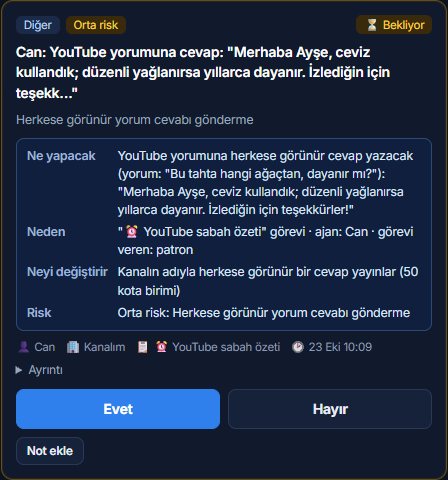
The purpose of this arrangement is simple: the agent prepares the draft, the decision is yours. All sending and deleting steps go through this card.
How a morning goes
- At 09:00 the scheduled job starts by itself.
- The agent reads the state of the channel or the store and prepares its summary.
- The summary lands on the Reports screen (Raporlar); draft replies for new comments or questions sit in the same report, marked "not sent".
- If you really want to send a reply, the agent opens an approval card on the Decisions screen.
- You approve, or reject and add a note. Nothing goes out without approval.
If you do not want to wait, you can start the job by hand from the scheduling screen at any time.
Scheduling
The daily job appears on the scheduling screen in the app. There you can switch it off and on or run it immediately. While the job is off, the agent does nothing by itself.
Narrow authority: on purpose
The toolset of these two roles is kept narrow on purpose. There are no tools for writing code or running commands; the agent uses only the tools of its own field (channel tools for YouTube; product, order and return reading tools for Trendyol), the browser, and the card, report, memory and scheduling tools. The Trendyol tool only reads; all seven requests made during testing were read requests and there were no write requests. There is also a team template named "E-commerce (Trendyol)": it is set up with a lead and one Trendyol agent.
What you should know
- The ones who write drafts are models, and they can be wrong. Read before you send; that is exactly what the approval card is for.
- Agents run on your computer; the Agent X site's server does not see channel and store data. The agent's model (Claude or Codex), however, processes the data it reads while working through your own account. Morning jobs therefore show up on your account like normal model usage; see Connecting your Claude and Codex account for details.
- During testing YouTube and Trendyol responses were provided by a fake setup. A real morning run of the agents with the light model (Haiku) and the "Yes" path on the approval card have not yet been tried by us on real accounts. If something does not work as you expect, write to us with the Suggestion / Complaint button.
Next step
For the general working order of an agent team see How the agent team works. All the version changes are in Release 0.1.33. You can get the app from the Download page.