‹ Blog · October 13, 2026
What is Agent X? An AI office that runs on your own computer
Agent X is a desktop app where you run a team of Claude and Codex agents from a 3D office. What it does, what it does not, and where your data stays: a short but complete introduction.
Agent X is a desktop app that lets you manage AI agents like an office. The agents run on your computer, with your own Claude or Codex account; you watch them from a 3D office, steer them, and approve what they do. This post explains what the app is, what it does and what it does not do.
A note on labels: the app's interface is currently in Turkish. In this post screen names appear in English, with the Turkish label in parentheses the first time it matters.
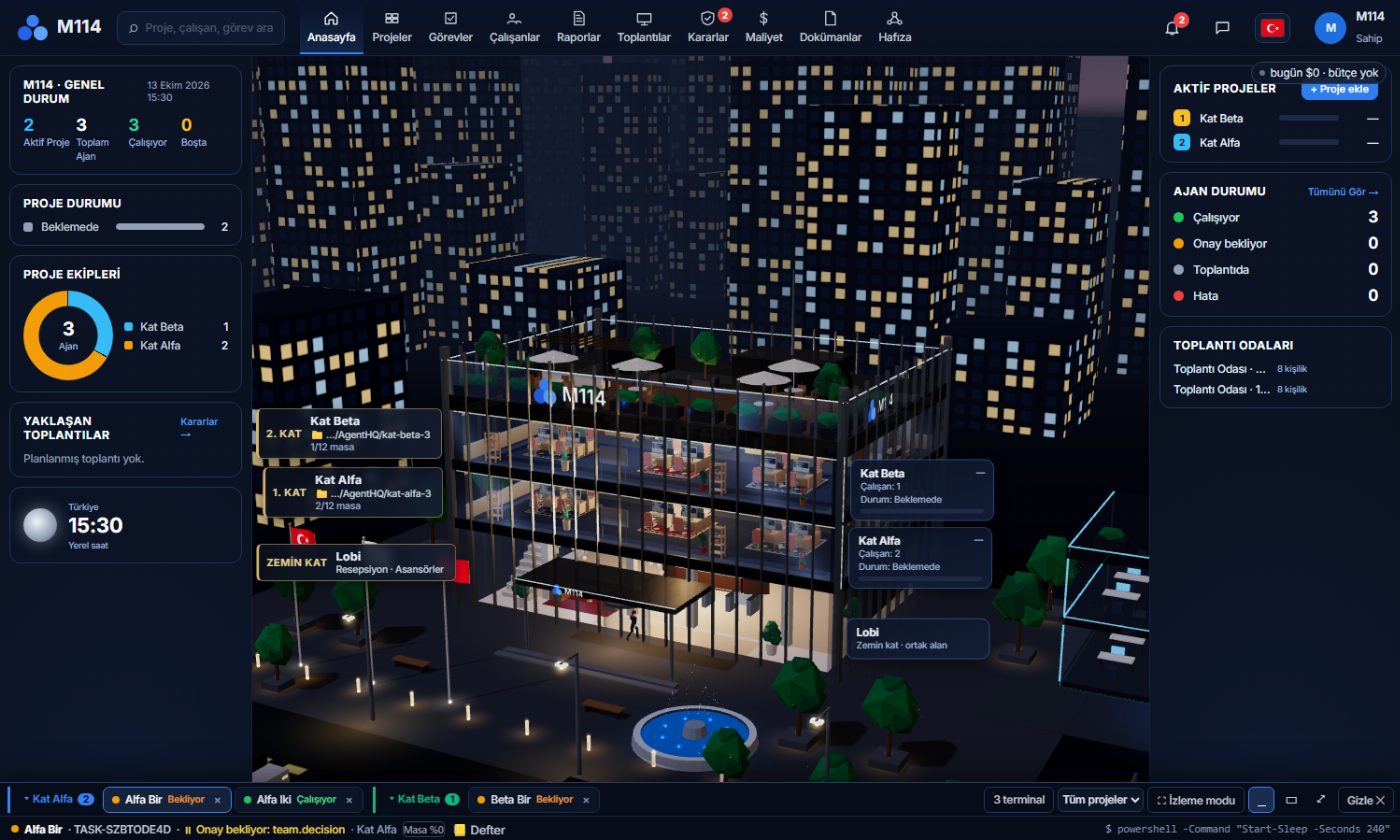
The idea: a team instead of a single chat
Most AI tools give you one chat window. In Agent X you manage a team with roles: a lead who splits the work, agents that write code, agents that design and test. Each agent runs on either Claude or Codex and sits at a desk in the office. You see at a glance what each one is doing, who is waiting for approval and who hit an error.
How the agent team works walks through the team step by step; this post gives the big picture.
How the office is organised
Your projects stand like the floors of a building. Each floor is a project, and a floor has 12 desks; when you add an agent, it takes a desk. The floor panel shows how many desks are taken and who is on the team. The point of this layout is simple: keep several projects, agents and terminals in view on one screen without losing track. For the details of floors, agents and terminals see Floors, agents and terminals.
What you can do
- Build an agent team. Put Claude or Codex agents with roles into each project. An agent can hand work to another agent.
- A real terminal. Agents work in a real terminal. You can walk up to one at any time, watch what is typed and step in. It is not a black-box chat.
- Task board and reports. Work flows across a board. Each task leaves a result report: the verdict, what was done, the evidence and the risks.
- Approval cards. Steps that leave your computer or are hard to undo are asked first. The card says what will be done, why, what it changes and its risk; you answer "Yes" or "No".
- Project memory. Agents keep what they learn about a project, so you do not have to explain the same thing again next time.
- Scheduling. Recurring jobs, for example a summary every morning at 09:00, are set up on the scheduling screen.
- Cost tracking. The office shows how many tokens each agent spent, and the total for today and this week.
Ready-made roles and Studio
The role list includes a team lead, backend and frontend developers, a UI/UX designer and QA, among others. Version 0.1.33 added two ready-made roles: YouTube Manager and Trendyol Manager. Both prepare a summary every morning, write reply drafts and ask you before sending anything (YouTube and Trendyol agents).
The same version brought Studio: a section that produces images and video on your own graphics card. Local generation works only on Windows with an NVIDIA graphics card; if your card is not enough, the rest of the app works exactly the same without Studio (Generating images and video on your own computer with Studio).
Where your data stays
Agent X runs on your computer. Your projects, agent conversations and files are not sent to this site's server; the app connects only for license and version checks. One thing should be said plainly: the agent's model (Claude or Codex) processes the data it reads under the terms of its own service. So your data does not go to this site's server, but it does go to your model provider. That is the natural result of working with your own account.
Who it is for and what you need
- Operating system: Windows 10 and 11. macOS and Linux are not supported for now.
- Account: your own Claude Code or Codex account. Agent X does not sell model usage; model usage runs on your account, and the Agent X subscription covers the app and the office layout (Connecting your Claude and Codex account).
- Plan: opening an account is free and does not ask for a card. You pay only when you buy a plan; plans are monthly, sold in US dollars and do not renew automatically (Plans and license).
- Phone: to watch the office from your phone and look at approval cards there is an Android app and a page that opens in the browser; details are on the Download page.
What it is not
Agent X is not an AI model; it is a management layer that runs on top of models. Agents can be wrong: approval cards exist for that reason, but reading the card and checking the output is up to you. The app is also Windows-only for now, and local image and video generation does not run on every computer.
Next step
To install, follow the three steps in Setup and first sign-in and see Plans and license for prices. If something is unclear, the FAQ has 27 answers. When you are ready, create an account and download the app.